AI Mantra Studio Fall 2026OnlineCohort 02

Most teens use AI to fake learning.
Yours will build a Learning OS.

A live 4-Sunday AI workshop for teens 13–17. Taught by an AI SaaS Founder and Microsoft Engineers. Your teen designs their own AI learning system, ships it as a real working web app, and points it at a goal they choose. Cohort 01 just did exactly that.

✦ 12 Seats Recordings Forever Live · Hands-on No Coding Needed ★ Portfolio + Award College-app ready
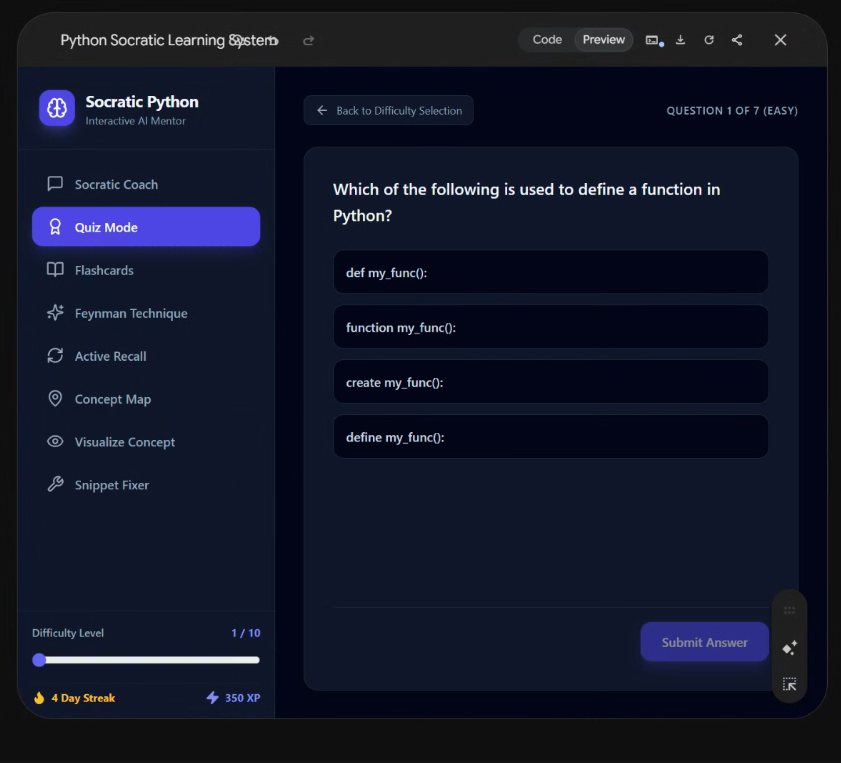
Adaptive Python Coach: a real web app built by a Cohort 01 student, showing quiz mode, flashcards, explain-it-back mode and a concept map
↓ Not a mockup. An 8th-grader in Cohort 01 built this app to teach himself Python.
Join the Cohort 02 Waitlist

Cohort 01 sold out and shipped. Cohort 02 opens this fall, 12 seats, waitlist gets first access.

★ Cohort 01 complete: 3 teens shipped 3 live AI apps and demoed them to parents · See what they built →

★ Free session for parents ★

Is AI helping your teen learn, or helping them skip it?

45 minutes on what AI is actually doing to how kids learn, and what to do about it. Free, no pitch, bring your questions.

Sunday 23 August · 6:00 PM PT · Google Meet

We’ll email you the Google Meet link and one reminder. Nothing else.

The thesis AI is an amplifier of whatever you point it at. We don’t teach app-building, we teach the loop behind it: name the problem, find the best framework, build the tool, aim it at your goal. The app is just the proof.

★ Cohort 01 · Completed July 19, 2026

Three teens. Three goals. Three shipped apps.

Cohort 01 ran June 21 to July 19. Each student picked a real summer goal, built their own AI learning system around it, and demoed a working web app live to their parents on Demo Day. These aren’t mockups, the apps are live right now.

Adaptive Python Coach web app built by a cohort 1 student: quiz mode, flashcards, explain-it-back mode, concept map
Shlok · Goal: learn Python

Adaptive Python Coach

A complete learning app he built for himself: questioning that never hands over answers, quizzes, flashcards, an explain-it-back mode, a concept map with locked levels, and a code snippet fixer. With XP and streaks, because of course.

Open the live app →
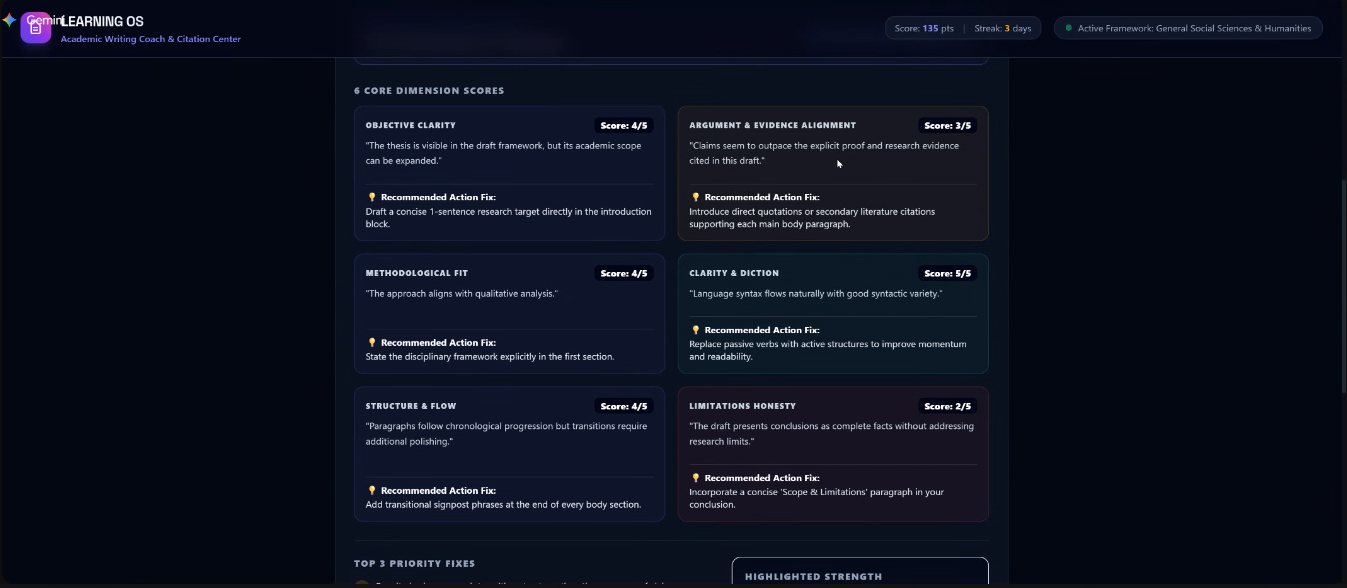
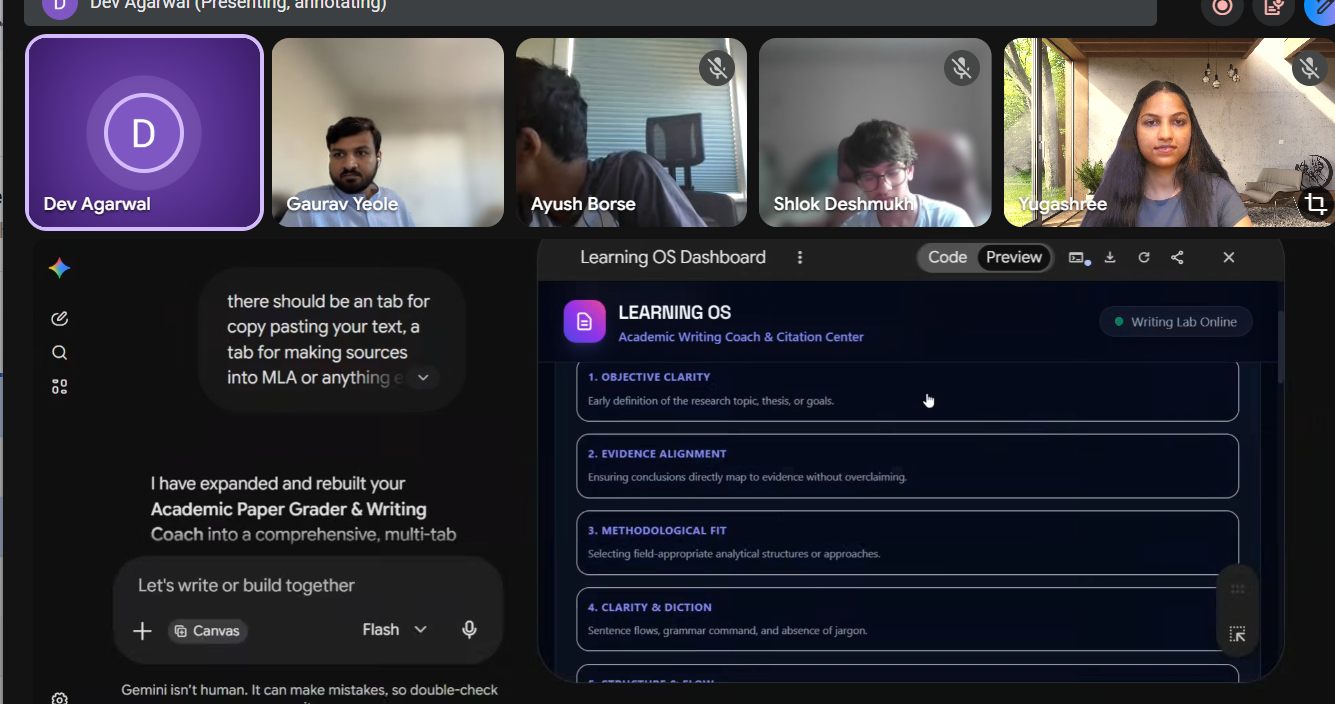
AI Paper Grader web app built by a cohort 1 student: six rubric dimension scores with recommended fixes
Dev · Goal: publish a research paper

AI Paper Grader

Paste a draft and it scores six rubric dimensions, flags the three biggest holes, generates citations, and analyzes your counter-argument. The AI-drafted example is deliberately non-copyable, his own anti-cheating rule.

Open the live app →
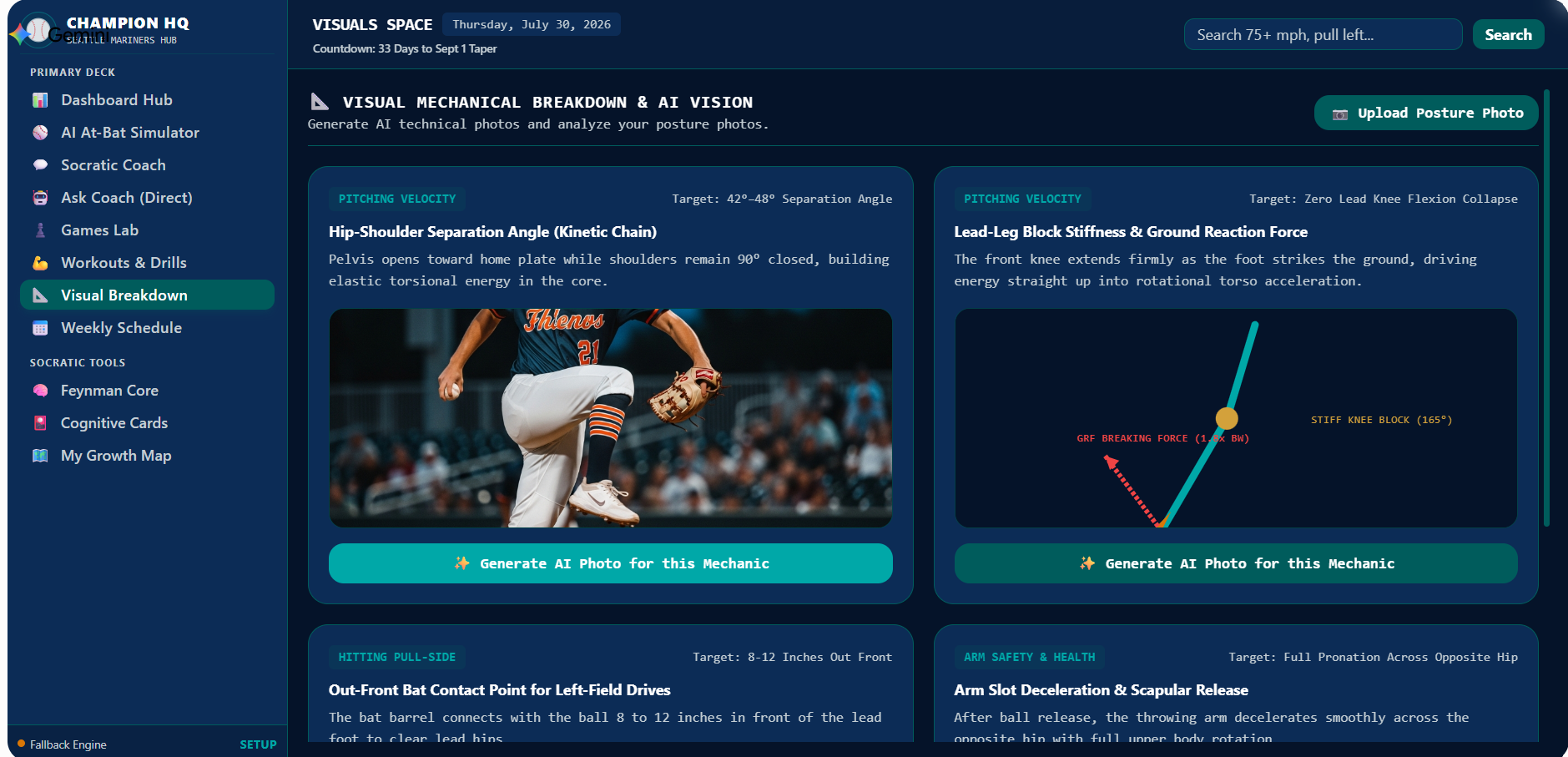
Champion HQ web app built by a cohort 1 student: a visual mechanical breakdown of pitching mechanics with target angles and ground reaction force diagrams
Ayush · Goal: train for baseball, body and mind

Champion HQ

Pictured: his mechanical breakdown, each movement with a target to hit — 42–48° hip-shoulder separation, zero lead-knee collapse. Behind it sits a Growth Map that sorts his own mechanics into Solid, Shaky and Missing and lets him promote or demote each one as he improves. He built a system that makes him name what he’s worst at, then watch himself move it.

Open the live app →

He missed Demo Day because his team made the baseball finals. Priorities, correctly ordered. He demoed it to us the week after.

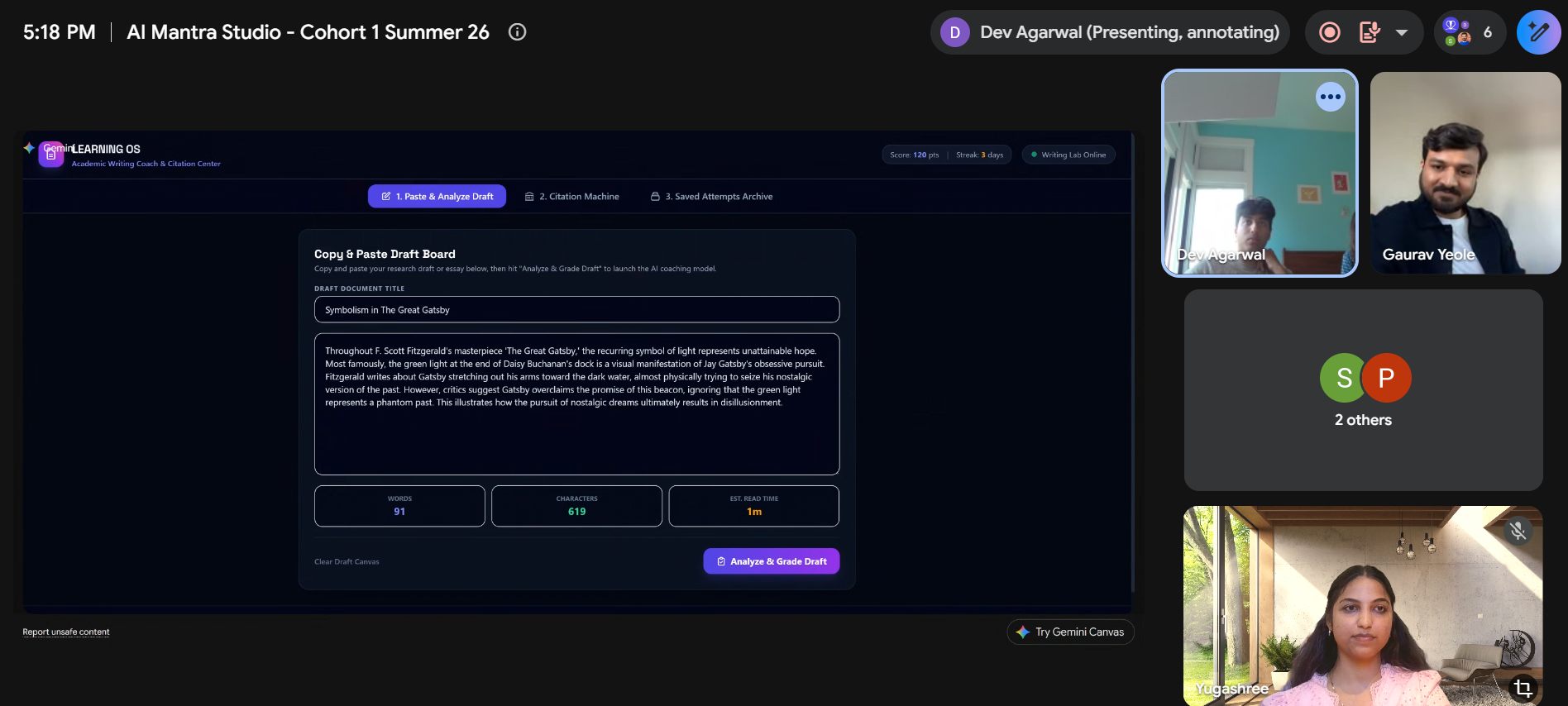
Demo Day on Google Meet: a student presents his Paper Grader app live to parents and instructors

Demo Day, July 19. Dev presenting his Paper Grader live, parents in the room, app running end to end.

Built by teens, over four Sundays. No coding experience required, that’s the point.

“I’m a software engineer and I tried to teach Ayush so many times, he never listened. After this camp he’s working on the homework by himself. That was a big surprise for me. I’m so proud.”

Yash · Ayush’s dad

“They can’t stop talking about you guys. Dev really enjoyed it, and what he learned will be really useful for his upcoming projects. We hope he continues to connect with you.”

Namita · Dev’s mom

“This is more than what we expected, and you delivered it. The Socratic technique, and teaching kids how to find the right framework for any problem: that’s a very good thing you are doing.”

Sunil · Shlok’s dad

How they build the Learning OS.

Fall 2026
4 Sundays · late September
Dates go to waitlist first

Five moves, spread across four Sundays. Your teen learns the loop by running it on something they actually care about. The loop is the thing they keep.

1

Name the problem. Find the framework.

They read an article, close it, and try to explain it back. Most can't. That's the gap, named out loud. Then they go looking for what actually works against it, and build their first coach: one that questions them instead of answering. Each teen names a real goal of their own to point it at.

Week 01
2

Codify it.

Week 2 opens with one question: "what did you learn last Sunday?" Silence says everything. So they build the practice into the tool itself, so it makes them do the work rather than doing it for them. Everything assembles into one system: the brain of the thing they're building.

Week 02
3

Break it, then patch it.

A chat window is a limiting body for a good brain, so they build a real one: tabs, quizzes, progress maps, streaks. One small feature at a time. Then they break it on purpose, make it tell them why it failed, and fix the cause rather than guessing. That's the habit engineers actually have.

Week 03
4

Aim it. Then demo it.

Before launch they assume the demo has already failed, hunt down every reason why, and fix those first. Then they point the finished system at the goal they picked in Week 1 and present it live to parents: their story, their working app, end to end. Certificates and hosted portfolios follow.

Week 04
they keep → Hosted portfolio Verifiable credential Edited demo video
Why this works

AI literacy isn't a future skill. It's a now skill.

Your teen will use AI through school, college, and their entire career. We teach them the right, ethical way to use it.

Most teens use AI to fake learning. Yours will use it to actually master what they care about. That's the difference between AI helping them think and AI doing the thinking for them.

Taught by people who actually build this.

Most AI workshops are built by curriculum companies. This one is built by AI engineers.

GauravG
Gaurav
AI SaaS Founder · Microsoft Engineer

Senior Software Engineer at Microsoft and Founder of Kaaizan (an AI productivity app). Teaches the build sessions and ships agentic AI for a living.

ChetnaC
Chetna
Microsoft Engineer · MBA · Parent of Teen

Senior Software Engineer at Microsoft, MBA, and Parent of Teen. Knows how this audience learns because she lives with one.

YugashreeY
Yugashree
Kaaizan Co-founder · Fractional CMO

Co-founder of Kaaizan and Fractional CMO to early-stage startups. Builds AI automation workflows and writes the marketing playbooks other founders quietly follow.

Format & what's included.

4 live Sundays
All recordings, yours forever
Live Demo Day with parents
Paired capstone mentoring
90-day mentorship support
Claude + AI tool access
When
4 Sundays · late September 2026 (exact dates to the waitlist first)
Length
90–120 min each
Cohort
12 teens · Ages 13–17
Prereqs
Laptop · No coding
★ Cohort 02 · Fall 2026 ★

8+ live hours with 1:1 coaching · a working web app they build themselves · hosted portfolio · verifiable certificate · recordings and playbook forever · alumni community + office hours

$599, all in.
That’s under $100 per live hour, taught by the people who build AI for a living. 12 seats only.

aimantrastudio.com

How the waitlist works

  • Drop your email. That’s it, no payment now.
  • Fall dates go to the waitlist before anywhere else.
  • Waitlist members keep the $599 Cohort 01 rate.
  • 12 seats, offered in waitlist order.
★ What it’s worth ★

Real value, compared honestly.

Most AI summer programs charge $1,500–$2,500. We’re running cohort 1 as a small founder-led pilot, so we’re pricing it differently.

What your teen actually gets

  • 4 live Sunday cohort sessions
  • 3 working AI tools they build & keep
  • 1 capstone project of their choice
  • Hosted portfolio page (12 months)
  • Verifiable digital credential
  • Polished, edited demo video
  • Lifetime access to recordings
  • 90 days post-cohort email access to Gaurav
  • Alumni Discord community
  • Live Demo Day with parents

What this would cost elsewhere

  • iD Tech AI Camp $1,500 – $2,500
  • Inspirit AI Workshop $2,000+
  • 1:1 tutoring with an AI engineer
    ~$150/hr × 8 hrs
    $1,200+
Cohort 01 · Founding rate $599

Why cohort 1 is priced this way: this is the founding cohort, we’re capping at 12 to keep it tight, capture real feedback, and build the first wave of testimonials. Future cohorts will run at a higher rate.

Questions parents ask.

Does my teen need to know how to code?

No. They build AI tools using natural language, not Python.

What does my teen actually pick to master?

Anything they care about. Past examples: a guitar piece, a working website, options trading basics, AP Chem, screenwriting, debate prep, a foreign language. Academic or non-academic both work.

Will my teen work alone or with a partner?

The capstone is paired by topic interest. Peer learning at this age is genuinely powerful, teens unstick each other faster than instructors can. Solo off-ramp available by Session 3 if a pair stalls.

What does the digital credential mean?

A verifiable digital badge signed and dated by the instructors. Add it to LinkedIn or link it from college applications. It's not an accredited certification, but it's a real, verifiable record of completion.

How does the portfolio help college applications?

Your teen gets a hosted page with their capstone, tools, and demo video. Link it from college applications or scholarship essays. We host free for 12 months; after that they can self-host.

What if my teen misses a session?

Every session is recorded and posted within 24 hours, yours forever. If they miss a Sunday, we'll also schedule a 1:1 catch-up call so they don't fall behind.

Is this affiliated with a school or Microsoft?

No. It's independent. Gaurav and Chetna work at Microsoft, but the program isn't affiliated with or endorsed by Microsoft.

Is my teen safe online?

Private link-only Zoom, parental consent required, written code of conduct. Online-only delivery means no in-person concerns.

What AI tools do they use?

Claude (primary) plus simple workflow tools where useful. We provide all access. No paid subscription needed.

Can I watch?

Parents welcome at the Session 1 intro (first 10 min) and the full Demo Day on July 19.

What if my teen doesn't like it after Session 1?

We'll talk to you. Refunds aren't standard once the program starts, but we want teens excited to be there. If it's clearly not a fit, we'll work something out.

★ Live from our previews · May 2026

Snapshots from our previews.

Three preview sessions, eleven teens total, including two full 90-minute Session 1 runs over Google Meet. Here’s what they built, what they said, and what they could explain back in their own words.

Cohort 02 lands this fall. Waitlist hears first.

Join the Waitlist